The idea, in plain English
Start here.
A usability test observes intended users attempting believable tasks so you can learn where the interface helps or blocks them. Use neutral instructions, record behavior and any assistance, and turn findings into changes you can retest. Accessibility checks examine additional requirements such as keyboard operation, labels, text alternatives and contrast. A small study or automated score does not establish that every user can complete every task or that the whole site conforms to a standard.
If you tell someone exactly which menu to open, you learn whether they can follow your directions. To investigate whether the navigation makes sense, give them the goal and observe their route. Keep an assisted finish distinct from independent success, and record the actual obstacle rather than labeling the person as confused.
A few words you’ll meet.
OPEN WHAT YOU NEED ↙Neutral task
A believable goal with enough context to attempt it, without revealing the interface route or answer.
Observation
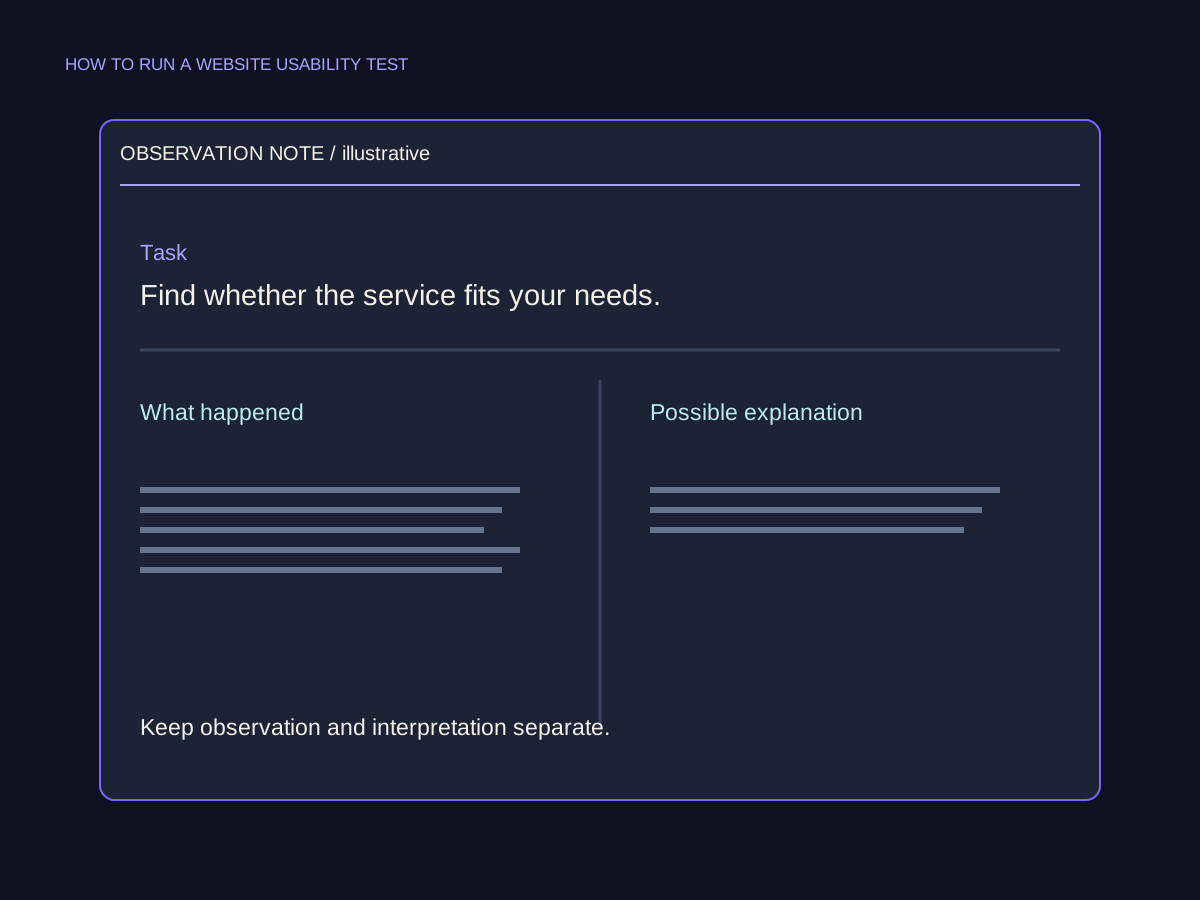
What someone did or said under the recorded test conditions, kept separate from your explanation of why.
Assisted completion
A task finished after help from the moderator; it should not be reported as unassisted success.
Accessibility check
A specific evaluation of an access requirement or barrier, with its method, scope and result recorded.
Choose the question, participants and task
Write the decision the test should inform. For example, can a new library visitor find loan-extension conditions and understand the next step? Choose a prototype when you need to investigate structure or wording; use functioning behavior when your question depends on actual input, feedback or receipt. Make the environment and any dummy data clear.
Recruit actual or likely users with relevant circumstances and access needs. Plan an accessible session, explain what will happen and agree how notes or recordings will be used. Pilot the task wording before the session. There is no fixed participant count that guarantees discovery of every issue: a small exploratory round can reveal useful problems, while a population-level performance estimate needs a study designed for that purpose.
Give the goal without teaching the route
Use a scenario such as: ‘You borrowed a book and need it for another week. Find out whether you can extend the loan and what to do.’ Avoid naming the menu or button the design expects them to choose. Explain that the service is being tested, not the participant. Observe their route, hesitations, workarounds and comments; invite them to describe their thinking when that helps the question.
Use neutral follow-ups about what they expected. If you intervene so a stuck participant can continue, record the help and the point it occurred. Do not count the result as independent success or silently remove the difficult part from the report. Moderated research can be remote or in person; those describe location, whereas moderated and unmoderated describe the facilitator’s involvement.
Keep the observation and its limits together.

Add specific accessibility checks
Check whether the important task can be operated through the keyboard interface and whether the focus is visible and usable. Inspect form labels and necessary instructions, and whether meaningful visual information has an appropriate text alternative. Decorative imagery needs different handling from information-bearing imagery. Enlarge the content and inspect reflow rather than assuming a desktop layout works for every reader.
Measure text contrast against the actual foreground and background. W3C’s minimum contrast criterion specifies 4.5:1 for ordinary text and 3:1 for qualifying large text, with stated exceptions. A qualifying large-text result cannot be applied to a small caption. Use the criterion and its definitions, record the checked state and avoid rounding a failing value into a pass. These starter checks complement research with people; they do not cover the entire accessibility standard.
Turn the observation into a fix and a retest
Keep the task, setup, outcome, behavior, evidence and assistance together. Separate ‘the participant opened Services twice before asking for help’ from ‘the label may not match the visitor’s expectation.’ The first is an observation; the second is an interpretation to investigate. Do not turn a few sessions into a precise claim about all visitors or a guaranteed conversion increase.
Prioritize the consequence for the task, its severity and the evidence available. A keyboard blocker on an essential action can deserve attention even if it appeared in one check. Choose a specific revision, assign an owner and repeat the relevant task and access checks afterward. Include unresolved findings in the report. A thoughtful retest is more useful than a large list of screenshots with no decision attached.
An assisted finish is still an important finding
Original fictional library test log. These observations and the contrast value are invented to teach reporting; no participant session or live accessibility assessment was conducted.
| Fictional evidence | Supported finding | Next check |
|---|---|---|
| Participant A opens Services twice, then asks for help | Difficulty finding loan-extension information in that session | Review labels and the route using a neutral task. |
| Participant B finishes after the moderator points to the link | Assisted completion, not independent success | Repeat the task after a justified revision without that hint. |
| Keyboard check cannot activate the extension action | A task blocker under the recorded setup | Fix the interaction and retest the same path. |
| Ordinary-text contrast is 3.2:1; no exception applies | Below the 4.5:1 minimum for that text | Adjust the relevant colors and measure the actual state again. |
Put it into practice
Repair the test and the conclusion
A moderator says ‘Click Services, then Extend, then Submit.’ One participant needs that hint. A separate keyboard check fails, and an ordinary-text label measures 3.2:1 without a relevant exception.
- Rewrite the task as a believable goal without revealing the route.
- Describe the assistance and its effect on the outcome classification.
- Write one observation separately from a possible explanation.
- Identify the specific accessibility findings and checks to repeat.
- Write a limited conclusion and an owned next action.
Keep your working notes in your own document. This page saves only your completion check, not your answers or customer data.
Check your understanding
Make the call.
Choose an answer for each question. Then compare the reasoning.
You have a useful next step.
- Ask a real question with neutral tasks and relevant participants.
- Keep behavior, assistance and interpretation distinct.
- Check specific access requirements and retest meaningful changes.
Completion is your own learning record. Quiz scores and practice checks are saved separately, on this browser.
Sources & context
The sources below explain the factual foundations and editorial methods used in this lesson. Worked examples, planning models and exercises are illustrative teaching material.
- GOV.UK: Moderated usability testing
Full primary method for research questions, believable non-leading tasks, observing participants, recording context and accessible session setup.
- W3C: Keyboard
Previously reviewed substantive primary criterion and intent, including its path-dependent-input exception.
- W3C: Contrast Minimum
Primary criterion and opening intent reviewed for ordinary/large-text thresholds, exceptions and no rounding into a pass.
- W3C: Labels or Instructions
Primary criterion and opening intent reviewed. Visible instructions, programmatic relationships and accessible names are related but distinct requirements.
- W3C: Non-text Content
Primary criterion and opening intent reviewed for equivalent purpose and specified exceptions, including decorative content.
Explore the full companion guide
This lesson is also part of the journal. Keep reading for the original guide, supporting references and further detail.
A website usability test helps you understand how people complete a task on your site. Choose a question the team needs to answer, ask relevant participants to try a realistic activity and observe their actions with neutral guidance. Record the evidence, decide what it suggests changing and test the important task again after the change.
Choose a decision you can act on
Name the uncertainty before arranging sessions. Perhaps visitors struggle to judge whether a service fits them, to find delivery information or to understand what an inquiry requires. Choose the part of that journey you want to examine and define what successful completion would look like. That gives the session a useful boundary.
Write down what the team will do with the answer. A finding may inform a label, a missing explanation or a change to the contact flow. GOV.UK's moderated-testing guidance describes watching people attempt specific tasks and using that behavior to identify problems. A small qualitative round can inform practical design decisions; it does not establish how frequently a problem affects your entire audience.
Recruit people who match the journey
Look for people who have a reason to perform the activity. Someone researching a first purchase may need different information from a returning customer. Staff who know every navigation label can help you pilot the session, but their familiarity limits what they can reveal about a new visitor's experience. Record the context each participant brings so the findings remain understandable.
For a task on a phone, the mobile website journey guide helps you check the route, controls and form behavior to observe. Include people who use the relevant device and any assistive technology, and let them use a setup they are familiar with.
Choose an in-person or remote setting that lets you observe the task clearly. Check the test link, screen sharing and any agreed recording before the session. Explain the purpose, expected activity and handling of notes or recordings. Use appropriate test information for forms and stop before an unintended purchase, message or live submission.
Give a goal without naming the route
Write a short scenario containing the information a person needs to act. For a furniture business, an illustrative task could ask someone to find out whether a custom desk is available for their room and prepare the details needed to request an estimate. Specify the room constraint or delivery area if it affects the decision. Avoid naming the page or button that you expect them to choose.
Ask the participant to use the website while you observe. An account of where they might click gives you different evidence from the action itself. Nielsen Norman Group's task-writing guidance recommends realistic, actionable scenarios that avoid route clues. Try the task in a practice session to catch missing context, an unavailable page or instructions that accidentally provide the answer.
Observe before you explain
Introduce the session calmly and make clear that any confusing step is something the team needs to examine. Invite the person to describe what they are looking for and what they expect to happen. Allow time for them to act. A pause, a return to an earlier page or an unexpected route may reveal something worth asking about.
Use open follow-up questions to clarify what you observed. Ask about the expectation behind an action, without suggesting the desired answer. If you need to help someone continue, record where you intervened and what you explained. Keep that assisted outcome distinct in your notes so a coached completion does not look like an independent one.
Give a note-taker the task description and completion condition. Record the relevant page, action, hesitation and participant comment while they are fresh. Observers should allow the moderator to run the session and save their own questions for an appropriate pause. Review the notes together afterwards and separate uncertainties from clear observations.
Turn observations into specific findings
Organize the notes around the tasks. Identify where people progressed, where they needed help and what remained unresolved. Preserve enough context to distinguish a website problem from an unclear test instruction or a technical interruption. Digital.gov's guidance emphasizes documenting evidence, looking for patterns and prioritizing findings the product team can use.
Keep an observation separate from its possible explanation. A participant opening several pages while looking for required measurements is an action you can record. A conclusion that the inquiry page lacks preparation guidance needs to be checked against the page and the participant's explanation. State the evidence, the consequence for the task and the proposed change together. Mark constructed examples as illustrative and report actual participant counts instead of turning a small round into an impressive percentage.
Change one obstacle and test again
Choose the next change from the evidence and its effect on the task. A missing fact or broken action deserves a clear response. A subjective layout preference may need further observation before it becomes a requirement. Give the improvement an owner and define what you will check when it is ready.
If the findings point to several connected templates or an unsuitable underlying structure, use them to scope a website redesign project. Keep the observed tasks attached to the project so the release can be checked against what visitors actually need to accomplish.
After the change, return to the task with relevant participants and record the result and any remaining difficulty. Note differences in the page, participant context or session setup when comparing rounds. A useful outcome is an evidence-backed decision about the journey and what to improve next. A conversion effect would need its own measurement and cannot be inferred from a cleaner test session alone.
Choose one uncertain customer task, write a neutral scenario and arrange a small, relevant round of observation. Keep a short record of what happened, any help given and the change the evidence supports.
How many people should take part in a usability test?
Choose the round around the decision, relevant user groups and the variation you need to observe. Work with one participant at a time, review patterns and arrange further sessions where important questions remain. A small qualitative round is useful for finding specific obstacles; estimating population rates needs a suitable quantitative study.
Can friends or colleagues help test the website?
They can help pilot the link, timing and instructions. For findings about customers, recruit people whose needs and familiarity match the actual journey. Record any existing knowledge of the site, because someone who already understands its labels may approach the task differently from a first-time visitor.
Should I explain the website when someone gets stuck?
First allow them to attempt the task and ask an open question about what they expected. You can help when continuing the session is useful, but record the intervention. That preserves the difference between independent completion and a result reached with moderator assistance.
Companion guide references
- GOV.UK: Using moderated usability testing ↗
Method guidance on tasks, relevant participants, observation and accessible research setups; last updated October 2017.
- Nielsen Norman Group: Task scenarios for usability testing ↗
2014 guidance on realistic, actionable scenarios and avoiding interface-route clues.
- Digital.gov: How to conduct a usability test ↗
Official guidance on participant context, neutral facilitation, documented findings and acting on evidence.
Put it into practice SEO Supreme
Try a task that leaves the route open.
Illustrative scenario: a homeowner wants to know whether a repair service handles a particular type of job in their area. The test should reveal how they find that information without telling them which menu item to select.
Use this goal.
'You need help with a leaking window at your home. Find out whether this business could help and how you would make an inquiry.' Use a scenario appropriate to the participant instead of requiring specialist knowledge.
- Realistic situation
- Open task
- Participant goal
Avoid this instruction.
'Open Services, select Window Repairs, then click Contact.' That sequence gives away the route and makes it harder to learn whether the navigation and wording are understandable.

Record a useful observation.
'The participant looked for a service-area statement on the service page, then returned to the homepage.' Keep that observation distinct from your interpretation. A follow-up question can help clarify what they expected to find.