The idea, in plain English
Start here.
Redesign when a documented problem requires changes to the website’s structure, experience or technical foundation. Start by checking the task that fails and whether a smaller repair can address it. A dated appearance, a competitor’s launch or a birthday does not establish the need for a rebuild. Define the scope, preserve useful content and working routes, test the candidate and plan how the result will be checked after an authorized release.
A new look can be valuable, but it is a response to a problem rather than evidence of one. Before opening a design gallery, write down what visitors and editors need to accomplish, what currently gets in their way, and how you know. This gives the project a reason and makes its size easier to defend.
A few words you’ll meet.
OPEN WHAT YOU NEED ↙Focused repair
A limited change aimed at a specific issue, such as an unclear label or a broken form behavior.
Visual refresh
An update to presentation, such as type, spacing or imagery, while much of the existing structure remains useful.
Redesign scope
The agreed changes to content, structure, components, workflows or technology, with explicit boundaries.
Release gate
The evidence and unresolved issues considered before deciding whether the candidate can be released.
Start with a task and an observed problem
Describe what the website must help someone do. A customer might need to understand a service and request a quote; an editor might need to update accurate information. Inspect those journeys and record the obstacle. ‘The request fails after submission’ is a testable problem. ‘The site is old’ describes time, not whether the task works.
Review the current offer, important pages, user observations, access barriers, forms and publishing workflow. Save relevant reports with their dates, filters and definitions. A decline in requests is a reason to investigate, not proof that the design caused it. If no reliable baseline exists, state the gap and establish a useful measure before claiming improvement.
Compare the smallest useful change with a rebuild
A focused repair may solve an isolated problem. A refresh may suit a sound structure that needs clearer presentation or better images. A broader redesign becomes a candidate when the offer no longer fits the information structure, essential components prevent usable interactions, or the platform cannot support necessary maintenance. These labels help discussion; define the actual deliverables instead of assuming everyone means the same thing.
Ask what must change together and why. A form problem might need a label revision, an integration repair or a component replacement. Those have different dependencies. Have the responsible specialist examine a suspected platform limitation before treating it as a reason to replace everything. Compare expected benefit, evidence, effort, disruption and the ability to check the result.
Size the change around the evidence.

Preserve useful work and plan changed addresses
Inventory important content, addresses, internal links, files and workflows before changing them. Decide what remains accurate and useful, what needs revision, and what has a justified replacement or retirement. Low traffic alone does not make a page disposable: it may support an essential customer or staff task. Keep useful addresses where practical rather than changing them for appearance alone.
When URLs must move, use a documented mapping to relevant destinations and test the actual responses and references. Google’s site-move guidance recommends relevant permanent redirects and coherent updates to links and other URL signals. A redirect does not guarantee unchanged rankings. Avoid combining unrelated large changes when sequencing them would make delivery and diagnosis easier.
Agree readiness before choosing a launch date
Assign owners for content, design, development, testing and release decisions. Confirm budget, dependencies and the people available to review the work. Choose a release window that allows monitoring and repair, rather than borrowing another company’s project duration. Prepare recovery arrangements appropriate to the change and make unresolved problems visible at the release gate.
Test critical journeys on the candidate, including mobile behavior, keyboard operation, form delivery, important content, redirects and measurement. After an authorized release, check the live behavior again and monitor relevant outcomes against the recorded baseline. A delivered interface, a passing task check and a later business improvement are different results. Explain which one the evidence supports.
A new color palette cannot repair a missing request
Original fictional case: Cedar Tool Hire receives reports that some date requests never arrive. The catalog is useful and editors can maintain it. The team also dislikes the old typography. These details are invented for scope planning, not a completed audit or business result.
| Evidence or gap | Reasoned first response | What must be checked |
|---|---|---|
| A test request displays a receipt message but has no delivery record | Investigate the request path as a priority | Find the failure, repair it and verify actual receipt |
| Catalog content and editing workflow remain useful | Preserve them unless further evidence changes the decision | Check the important pages and editor tasks |
| The team wants updated type and spacing | Scope a separate visual refresh | Check readability and critical interactions after the change |
| No evidence yet that the platform blocks a repair | Do not claim a rebuild is necessary | Have the technical owner assess the limitation |
Put it into practice
Write a defensible scope decision
Cedar Tool Hire’s useful catalog is maintainable, but a test date request never reaches the intended record. The team wants new typography. A proposed rebuild has no documented platform assessment or migration plan.
- Name the immediate user task and the observed failure.
- Separate the request-path investigation from the visual preference.
- Choose a provisional scope and state what evidence could change it.
- List what should be preserved or inventoried before implementation.
- Assign a release check and explain what later evidence would be needed to claim improvement.
Keep your working notes in your own document. This page saves only your completion check, not your answers or customer data.
Check your understanding
Make the call.
Choose an answer for each question. Then compare the reasoning.
You have a useful next step.
- Diagnose the task and constraints before sizing the project.
- Preserve useful content and routes; plan necessary moves.
- Use owned release checks and evaluate later outcomes separately.
Completion is your own learning record. Quiz scores and practice checks are saved separately, on this browser.
Sources & context
The sources below explain the factual foundations and editorial methods used in this lesson. Worked examples, planning models and exercises are illustrative teaching material.
- Chykalophia: Redesign or refresh?
Editorial method for distinguishing content, presentation and structural problems; no fixed diagnostic duration or guaranteed outcome adopted.
- Comlabs: Website redesign decision guide
Planning context for user journeys, publishing workflows, preservation and release checks; warning-sign counts are not treated as a rule.
- Google Search Central: Site moves with URL changes
Primary migration guidance already reviewed for the migration lesson: relevant mappings, permanent redirects, reference updates, sequencing and monitoring.
Explore the full companion guide
This lesson is also part of the journal. Keep reading for the original guide, supporting references and further detail.
Redesign your website when its structure, platform or shared page layouts keep you from fixing an important customer problem. Choose a focused update when the foundation works and the issue is limited to a page, message or action. Diagnose the obstacle first; the age of the design alone is a weak reason to replace everything.
Choose a focused fix or a broader redesign
Begin with an observable problem. Visitors cannot find the right service, a form fails on a phone, the offer has changed, or staff cannot keep important information current. Describe where it occurs and what the visitor was trying to do. “The site looks old” may be a starting concern, but it does not tell a project team which work will resolve it.
Then check how widely the problem appears. One unclear service description may need better copy. A menu that fails across every page may need a shared layout change. A platform that blocks necessary catalog or booking behavior may justify a broader rebuild. Ask what the smallest reliable improvement would be before commissioning a complete replacement.
When content, page structure and the transition need to change together, website redesign and relaunch becomes a coordinated project. Its scope should identify the affected journeys and the work required to preserve useful ones.
Record what the current site already does well
Save a dated page inventory before removing or merging content. Identify the pages people use, the questions they answer, their important media and the actions they support. Where reporting is available, record search landing pages and the business outcomes associated with them. Keep the reporting period and device breakdown beside each figure.
A baseline can include both numbers and task observations. For example, record whether a test inquiry reaches the correct inbox, whether customers can find appointment conditions and whether staff can update a service description. If tracking is incomplete, document that limitation and fix it as part of the project. Missing data should not become a fabricated before-and-after success story.
Turn findings into a clear scope
Separate the work into content, experience and technical dependencies. Content may need rewriting or new evidence. Experience work may change the order of decisions, navigation or shared templates. Technical work may include integrations, redirects, tracking or platform access. Name the responsible person for each dependency and the evidence needed to approve it.
Use the findings to write a website brief. List what must work at the first release and what can wait. If the project includes new photos, service details or policy changes, arrange their creation and review alongside the build. A layout cannot supply accurate business information that nobody has agreed to provide.
Protect useful pages during the move
Keep an established address when the page still serves the same purpose and there is no reason to change it. When an address must change, document the relevant replacement. Google's site-move guidance explains URL mapping and permanent server redirects; it also recommends checking the new site before moving traffic.
Give each old URL a deliberate decision: retain, update, merge into a relevant replacement or retire. Do not redirect unrelated pages to the homepage as a general fallback. Update internal links and canonical references to the intended destinations. Test the old addresses themselves after release, because a correct new page does not prove that incoming links reach it.
- Save the old-to-new URL map with the release record.
- Check priority pages, downloads and images that existing links may reference.
- Verify the actual redirect response and its final destination.
- Review indexing instructions, canonical URLs and the sitemap on the public release.
Define the evidence needed to launch
Write acceptance checks before the final design review. A quote request must reach its recipient. A booking must select the intended service and show the correct confirmation. A returning visitor must reach the replacement for an old address. Content must describe the current business. Assign a business contact to verify the parts the builder cannot confirm alone.
Review desktop, narrow screens, keyboard access and the states that appear after errors. Performance tools add useful evidence: Google's Core Web Vitals guidance sets good thresholds of LCP at 2.5 seconds or less, INP at 200 milliseconds or less and CLS at 0.1 or less, evaluated at the 75th percentile. These measure loading, responsiveness and stability; they do not replace a working contact journey.
Measure the new site without guessing
After release, verify the live journeys again and compare equivalent reporting periods. Separate branded search from nonbranded demand, and keep device, traffic source and season in view. A rise in visits can coexist with fewer relevant inquiries; a change in button clicks can occur without a change in completed bookings.
Use observed behavior to choose the next improvement. Record what changed, what else happened during the period and whether the tracking setup stayed comparable. If the site becomes easier to maintain or a broken action is repaired, document that concrete outcome immediately. Claims about sales or search improvement need their own evidence rather than being inferred from a better-looking homepage.
Write one sentence describing the customer problem, then identify the smallest reliable fix. If that fix requires changes across the site, build the redesign brief around those dependencies and the evidence needed to approve the release.
Does a redesign always improve SEO?
No. A redesign can improve useful content or technical behavior, but it can also introduce broken URLs, missing information or indexing errors. Define the search work in the scope and check the public release.
Should every page get a new URL?
No. Preserve useful addresses when the page purpose remains the same. If an address must change, map it to a relevant destination and verify the redirect.
How often should a business redesign its website?
Use changes in customer needs, business scope and technical limitations to make the decision. There is no universal age at which a website requires a full replacement.
Companion guide references
- Google Search Central: Site moves with URL changes ↗
URL mapping, permanent redirects and migration verification.
- web.dev: Web Vitals ↗
Official definitions and good thresholds, evaluated using field data.
Put it into practice SEO Supreme
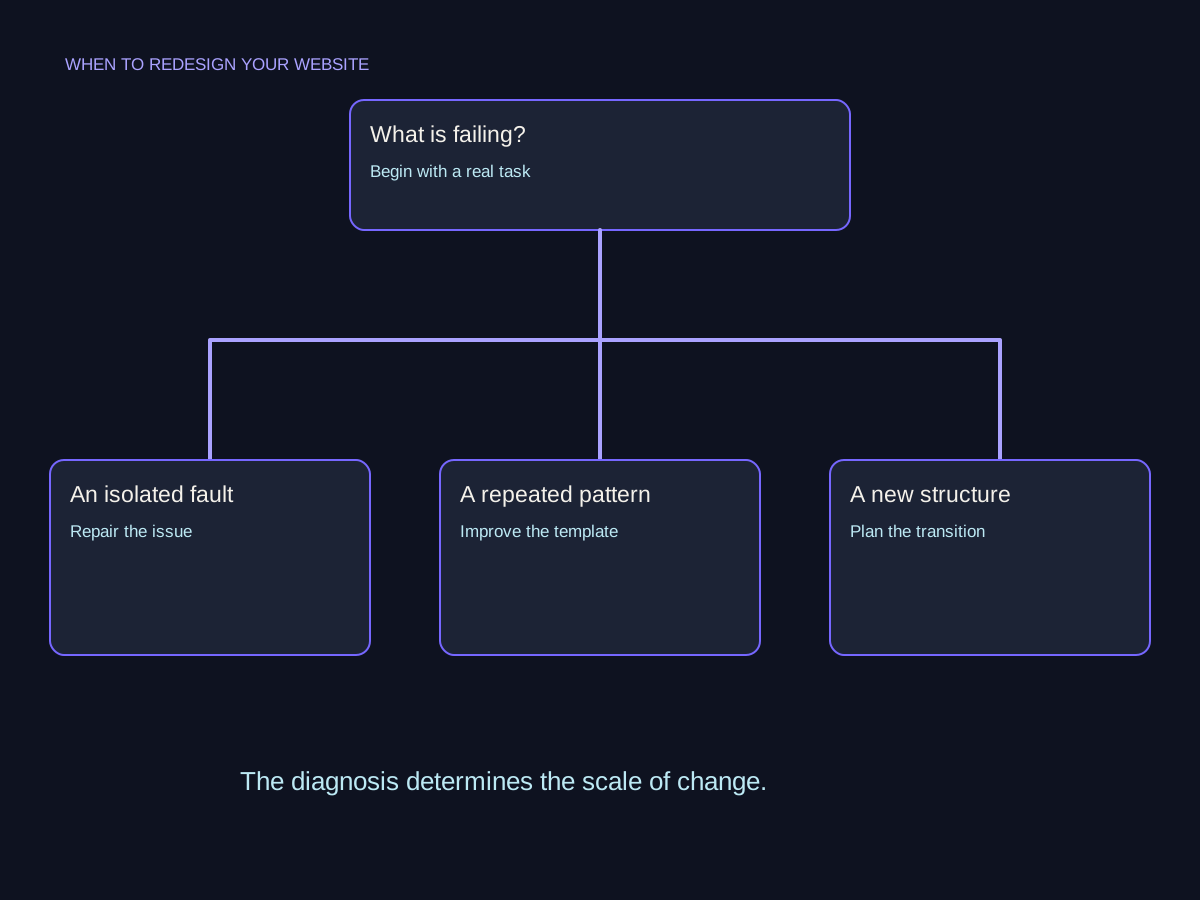
Three different problems. Three different scopes.
Consider a fictional small studio with a website it wants to improve. These three situations sound like redesign requests, but each has a different starting point. The examples illustrate scope decisions, not observed client outcomes.
The inquiry form fails.
Investigate and repair the form and its delivery process. Test the entire inquiry route afterward. The failure alone does not establish that the page structure or visual identity needs replacing.
- Form failure
- Targeted repair
- End-to-end test
Every service page hides the same key detail.
Review the shared template and content pattern. A targeted restructuring may fix the repeated problem while retaining pages, URLs, and functions that already serve visitors well.

The offer has fundamentally changed.
If the studio now serves different audiences with distinct services, rebuild the information plan around those needs. Include content ownership, URL decisions, and a transition check in the broader redesign scope.